The exe Architecture
Pools
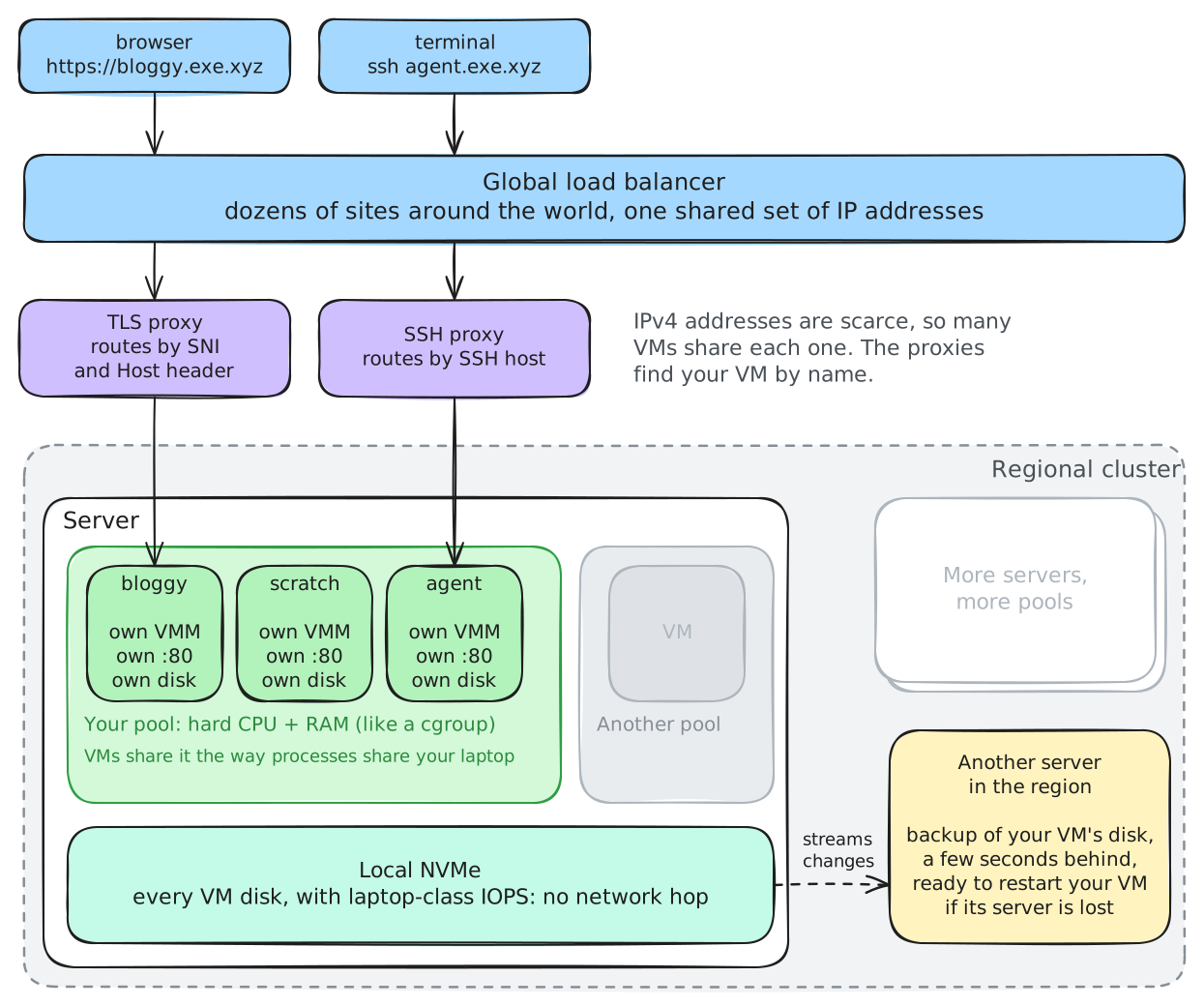
Each individual account is allocated a pool. Each work account creates one or more pools. A pool is a set of hard CPU/RAM resources on underlying hardware. (For those familiar with linux, consider it a cgroup.)
Inside this pool of CPU/RAM, we manage VMM processes for you: one for each VM you want. These VMs all share the pool of CPU and memory, just the way processes do on your computer or Docker containers do on a linux machine. It is up to you to decide what VMs you let use all your CPU and RAM.
The VMs provide strong isolation from one another, letting you run agents to build software without worrying about them interfering with each other. Each gets their own port 80, their own disk.
Disks
VM disks run directly on local NVMe. This means you see the sort of high-IOPS performance you are used to on your laptop, not the low-IOPS performance you typically see on a traditional cloud server that puts the disks 1ms RTT away over ethernet. These IOPS don't matter, until they do. For example, whenever your agent tries to compile software, the compiler toolchain is I/O bound. This is where local NVMe shines: when you want your cloud built for agents.
To achieve durability, i.e. your VM should survive even if the server it is running on is popped out of the rack by a backhoe, we constantly stream changes to your VM disk off machine to another part of the regional cluster. There is a backup of your VM, some few seconds behind, somewhere else in the cluster where it can be rapidly restarted.
This is a different kind of durability than you get out of a traditional cloud NAS. The tradeoff is IOPS. In practice, we find this "real-time backup" approach to durability suits our needs, and that of our customers. (The machine serving you this documentation right now is running as an exe VM.)
TLS/SSH proxies and global load balancers
Because you need a lot of VMs, far more than is reasonable to pay $2/month per IPv4 address, we pool IP addresses. To do this we use classic techniques such as running a TLS proxy that looks at SNI and the HTTPS Host header, and some new tricks for SSH. We terminate our global load balancer for these IPs at dozens of sites around the world and route the traffic to your VM.